
Digitizing Diaries and Books with an Overhead Scanner
Digitizing Diaries and Books with an Overhead Scanner
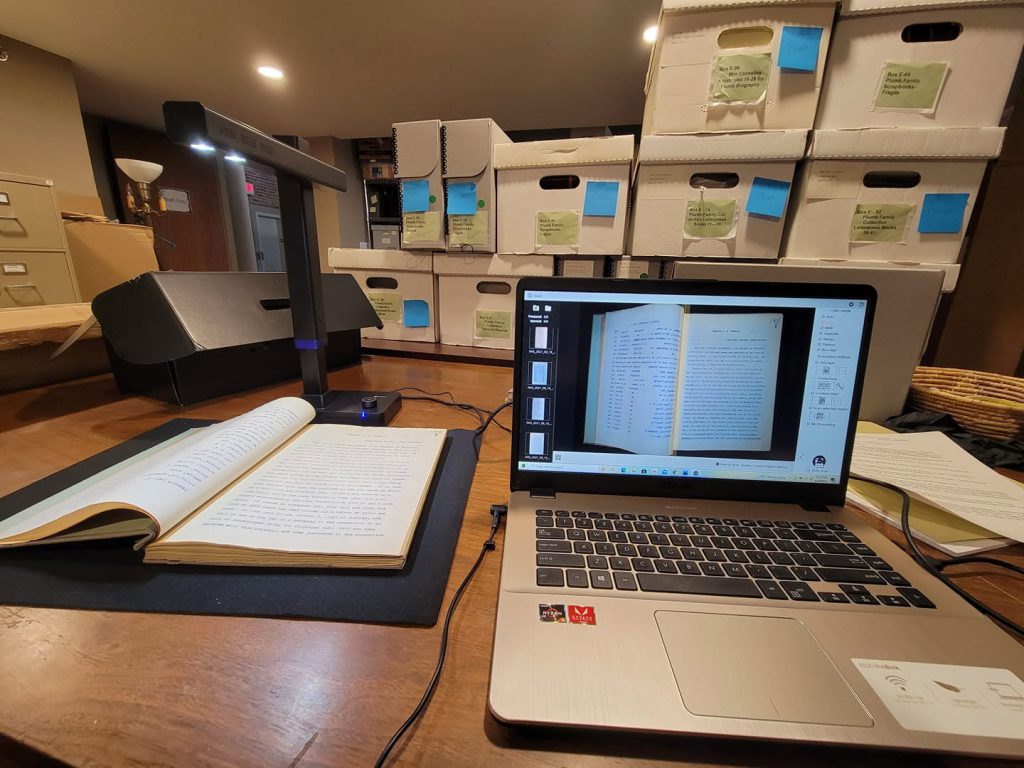
Digitizing your collection is something that I have recommended in several past posts, and for most cases, that is a pretty straightforward thing to do. Photograph your objects and scan your photographs. But diaries and other bound archive material can be a bit more difficult. This quick guide using an overhead scanner may give you some helpful tips to digitize diaries and other bound books without damaging them.
Whenever you’re digitizing something, making sure that the original item is not damaged in the process is the most important goal. Scanning bound books can be damaging when using a flatbed scanner. Opening the book wide, placing it facedown on the glass, and then closing a lid and pressing that down creates stress on the binding. For old books, that stress can be especially catastrophic and you may end up with a split binding, separated pages, or even tearing. To combat this, I recommend using an overhead scanner.
Overhead scanners work more like cameras than scanners but deliver high-quality scans without damaging the source material and digitize much faster than a flatbed scanner. I have used the CZUR brand for several years now and have used various models. The Aura Pro is a great travel friendly model that takes up less space and is easy to transport. For the highest resolution images, I use their newer model, the ET Max which images documents at 38 megapixels. There are now other brands selling similar products, but I cannot speak about their quality or features.
What’s great about this type of scanner is that the book or document lies flat on the included black pad which causes no stress to the artifact. The overhead scanner can automatically determine the document and digitally separates it from the background so that you end up with a perfect image of the document only. If you place the paper on the black pad crooked, it will be automatically straightened and the background removed. For books, the scanner has a special book mode that you can select which will digitally compensate for the curved pages at the spine. This means that it can scan two pages simultaneously, adjust for the curve in the text at the spine, and present you digital files of each page. From a time perspective, this allows you to set a book below the overhead scanner, click “scan,” image it as quickly as taking a picture, turn the page, and repeat the process. You can scan books that are hundreds of pages long in a matter of minutes. The CZUR scanners also include foot pedals to activate the scanning, which means you can move even more quickly.
Now, with antique books, things are always a bit more complicated, and at times the scanner can have trouble adjusting for the curve in the text at the spine. I have encountered this most often with old diaries that are small, tend to have light pencil handwriting, the writing goes close to the spine, and the pages do not carry enough weight to lay flat on their own. To compensate for this, I take the scanner off of its book scanning mode and set on flat imaging as if it is photographing flat sheets of paper. I use a thin sheet of clear acrylic and place that on top of the diary to hold the pages flat. This is not a lot of pressure, just enough to keep the pages from flying up, and it is enough to allow the scanner to get a full image of both pages. The acrylic plastic is used for picture frames, and you can buy it by the sheet in standard sizes such as 8X10 or 9X12 at places like Home Depot for a few dollars a piece. If your scanner has overhead lighting (as the CZUR does) you will likely have to turn that off when using the acrylic as it can glare.
If you have any interest in digitizing large volumes of paper, books, or fragile documents, I highly recommend an overhead scanner for the simple fact that it is non-damaging to the archive materials. Yet in addition to that, it will allow you to scan documents much more quickly and efficiently. If you are looking for very high resolution scans (such as 600 dpi or higher) you will need to use a flatbed scanner. But if you are simply trying to digitize and preserve a large volume of material, the overhead scanner is the most efficient way to go.
